PayslipService.com (LONDON) Office: 0203 397 2268
"Professional Service at No
Frills prices. Why pay more?"
Mobile: 07971 010 536
(9am-10pm, Mon-Sun)
|
Order Payslips/P60
Steps: Order formThis is a combined order form for Payslips and/or P60.Please complete this form with as much relevant info as possible. If ordering a P60, additional info is required in addition to the Payslips info. You may need to ask your employer for some info eg Tax office reference number. If you are unsure about
any question, write "NOT KNOWN" in the box
and and we will either resolve or contact you if
necessary. A copy of the form submission will be emailed to you to check spelling CAREFULLY and for confirmation of other details, so please provide a valid email address. Any mistakes due to customer incorrect spelling or supplied data will not be rectified without incurring an extra charge! (50% of original) Payment Method
We can only process the
order on receipt of cleared funds.
Return to the Home page and select from the item's menu options the quantity required. Click the "BUY NOW" button to pay. You will be redirected to a secure webpage where you enter the card details. All credit/debit card payments are processed through Payment processor. At no time do we see the card numbers. The billing address must match the delivery address.
You will need to swap money for a voucher, equivalent to the cost of order. a/ Go to any PayPoint outlet (to check for nearest outlet: PayPoint Locator), usually a newsagent, convenience shop or garage b) Purchase a "360money e-voucher". You will receive a slip in return c) Email or text us on 07971 010 536 ONLY the "unique reference number" eg. 12345678  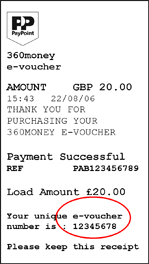
(For P60 (2010/11): If you have the exact figures (from March 2011 payslip) for "Total Gross Pay to date", "Total Tax to date", and "Employee NIC paid to date" please include these in the 'Comments' section. |